Traceability in Serverless (aws lambda)
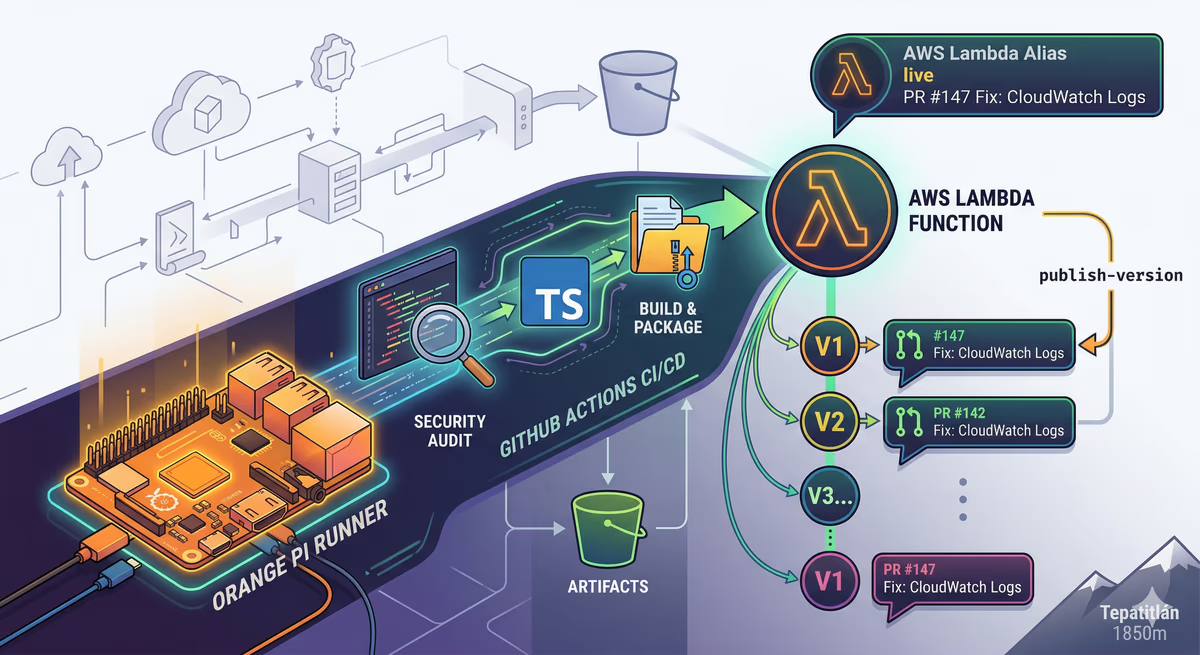
As a Senior Backend Engineer, I’ve always believed that traceability is not a luxury; it’s a requirement. A few days ago, while fine-tuning the CI/CD for my image handler service, I decided to fix a common headache: knowing exactly what code is running in a specific AWS Lambda version without jumping through hoops.
In this post, I’ll show you how I automated my deployment to ensure every Lambda version and Alias description matches the Pull Request title that triggered it.
The Problem: The "Anonymous" Lambda Version
By default, AWS Lambda versions are just incremental numbers ($1, 2, 3...$). When an error pops up in production (Version 42), you usually have to:
Check the deployment timestamp.
Go to GitHub.
Search for commits around that time.
Guess which PR was the culprit.
That’s too much friction. I wanted to see the PR title directly in the AWS Console.
The Setup: Self-Hosted & Serverless
I’m running my GitHub Actions on a self-hosted Orange Pi. Why? Because it’s cost-effective and gives me full control over the build environment. My stack for this project:
Backend: TypeScript / Node.js 22.
Infra: AWS Lambda, S3 (Artifacts), and Aliases.
CI/CD: GitHub Actions.
The Strategy: Extracting PR Data from Git Logs
Since the deployment happens on a push to main (after a PR is merged), we can extract the PR information using git log.
Here is the core logic I implemented in my deploy.yml. Note how we handle the merge commit message to get a clean PR title:
YAML
# Extracting the PR title from the merge commit
PR_TITLE=$(git log -1 --pretty=%B | sed -n '3p' | sed 's/["'\'']//g' | xargs)

if [ -z "$PR_TITLE" ]; then
  # Fallback: Clean the default merge message if the custom one is empty
  PR_TITLE=$(git log -1 --pretty=%s | sed -E 's/Merge pull request #[0-9]+ from [^ ]+//' | sed 's/["'\'']//g' | xargs)
fi
The Deployment Workflow
The workflow performs a security audit, builds the TypeScript code, zips the production dependencies, and uploads the artifact to S3. The "magic" happens when we publish the version:
YAML
# AWS CLI version publishing with PR context
- name: Deploy and Publish Lambda Version
  run: |
    # Publish a new version using the PR Title as the description
    NEW_VER=$(aws lambda publish-version \
      --function-name ${{ vars.PROJECT_NAME }}-image-handler \
      --description "$PR_TITLE" \
      --query 'Version' --output text)

    # Update the 'live' alias to point to this new version
    aws lambda update-alias \
      --function-name ${{ vars.PROJECT_NAME }}-image-handler \
      --name live \
      --function-version $NEW_VER \
      --description "$PR_TITLE"
Why this matters for a Senior BE
Instant Debugging: One look at the AWS Console (Lambda Versions tab) tells me exactly what feature or fix is "live".
Atomic Rollbacks: If the "live" alias fails, I can point it back to the previous version, knowing exactly which PR I'm reverting to.
Governance: It creates a clear audit trail between my code reviews and my infrastructure state.
Of course this is my approach but dependes on you what do you want to see in the versions in mi case was the PR title but depends on your github flow maybe for you should be the release version.
Support the Journey.
I create content and share knowledge from the serverless frontier. If you found this helpful, consider buying me a coffee!
Buy me a coffee
Comments (0)
You must be logged in to comment.
Login to Comment